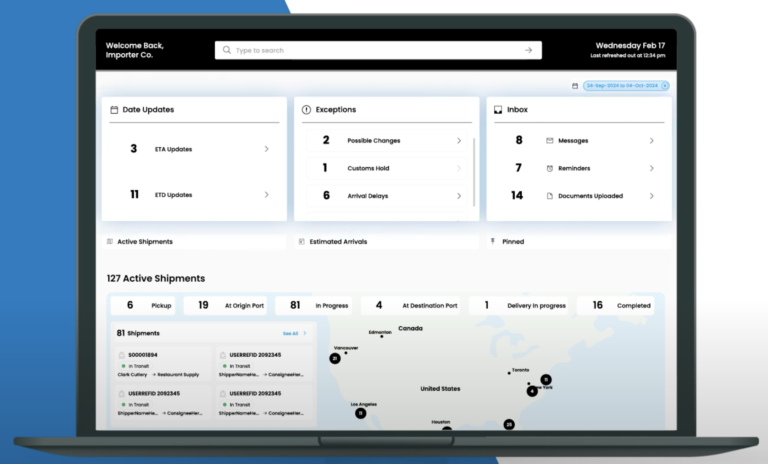
Captain puts visibility, customs, trade compliance, and warehouse modules on a single login, so one live picture replaces a stack of disconnected tools —
the software your goods move on, run by the team that actually moves them.
What Does Captain Supply Chain Software Actually Cover?
Captain supply chain software is one platform that unifies the modules an importer needs to see, clear, and move goods: a visibility and control tower for live status, a customs and trade software suite for clearance, duty, and compliance, and warehouse and rating tools, all under a single login instead of four disconnected vendors.
The difference is that the software is operated by the same licensed brokers and forwarders who touch your freight, so a status flag in the app and a broker on the phone are the same team. Milestone events, entry status, and inventory post to one feed as they happen, backed upstream by international freight forwarding and a licensed customs brokerage desk that files the entries you see in the platform.
Captain also shares its rate and shipment feed with the Atlas TMS platform, so the visibility layer and the execution layer read from the same data rather than reconciling two systems after the fact. You license the modules you need and add the rest as your flow grows, with no rip-and-replace between them.
14
Connected modules
1
Login and data feed
24h
Response time
Free Platform Tour
Talk to a Captain Product Lead
Quick 30-min walkthrough of the modules that fit your flow. No obligation.
We reply within 1 business day · Your data stays private.
Modules
The Captain Supply Chain Software Modules
Six module groups inside the Captain platform, from live visibility to customs, trade, and warehouse control, each linked to a dedicated page.
01
Visibility and Control Tower
One live operating picture of every shipment, exception, and cost across your network.
Live status on every booking, milestone, and exception in one feed
Configurable alerts that flag delays and holds early
One screen your whole team and your brokers read from
Exceptions routed to the person who can clear them
Captain is run by the same licensed brokers and forwarders who move your freight, so the status in the app and the person who can fix it are never two different companies.
Every module reads from one data feed, so a customs milestone, an inventory count, and a shipment event never disagree the way separate point tools do.
You license only the modules you need today and add the rest later, with no rip-and-replace because they already share one platform and one login.
The visibility layer feeds the Atlas TMS execution layer directly, so planning and moving freight run on the same numbers instead of a nightly reconciliation.
Our Process
How Captain Supply Chain Software Onboarding Works
01
Module Scoping
Map your flow to the Captain modules that solve it and skip the rest.
02
Integration Setup
Connect your ERP, store, and trading partners to the platform feed.
03
Configuration
Set entry rules, alert thresholds, roles, and warehouse logic.
04
Go Live by Module
Turn on visibility first, then customs, trade, and warehouse in sequence.
05
Review and Expand
Track platform metrics each month and add modules as you grow.
Get Started with Captain Supply Chain Software Today
Your supply chain should not live in a stack of tools that never agree with each other. Captain puts visibility, customs, trade, and warehouse control on one platform your whole team can trust.
CargoTrans gives you the software and the licensed operators who run it, so the numbers on screen match what is actually happening to your freight.
Free 30-minute guided tour of the Captain suite with a product lead
No-obligation review of which modules fit your current flow
Integration support from ERP and store to EDI trading partners
One platform run by the same brokers who clear your goods
A CargoTrans product lead will map your flow to the right Captain modules and integrations.
Protected by reCAPTCHA. We respond within 1 business day. No spam, ever.
Control Tower
Captain Control Tower, Live Across Your Supply Chain
The Captain Control Tower posts each booking, entry, milestone, and exception the moment it happens, so your whole supply chain is visible in one screen before the paperwork catches up.
Configurable alerts flag delays, holds, and stockouts early, and the same feed connects your inbound freight to multimodal transportation so replenishment and routing are planned, not reactive.
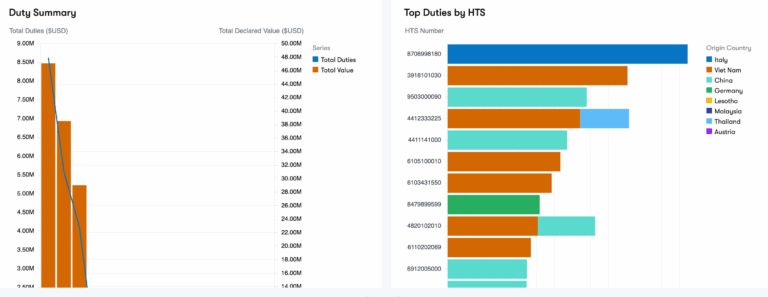
Every entry, classification, and duty calculation is handled inside the platform by licensed brokers, so your reasonable care file is built as goods move rather than reconstructed later for an audit.
Because the customs and trade modules share one record with your shipment and inventory data, a classification question or a drawback claim is answered from the same feed your operators already work in, not a separate spreadsheet.
Captain is CargoTrans supply chain software: a single platform that brings together the tools an importer needs to see, clear, and move goods. Instead of buying a visibility tool from one vendor, a customs system from another, and a warehouse system from a third, you get one login with fourteen connected modules that share the same data. Those modules cover live visibility and control tower, supply chain optimization and risk, the full customs suite from clearance to duty and compliance, a trade suite for compliance, drawback, tariffs, and advisory, plus warehouse management and rating. The important part is that Captain is not just software you configure and use alone. It is run by the same licensed brokers and forwarders who physically move and clear your freight, so the platform and the people behind it are one accountable team.
They fit together because they all read from and write to one data model instead of exchanging files after the fact. When a shipment is booked, the control tower sees it, the customs module files against it, the trade module screens it, and the warehouse module expects it, all from the same record. That means a customs milestone, an inventory count, and a shipment event never disagree the way they do when separate point tools sync overnight. A duty figure calculated in the customs module is the same one the tariff calculator and landed-cost views use. This shared model is the whole reason Captain is a platform rather than a bundle. Adding a module extends the same picture rather than opening a new silo you then have to reconcile against the others.
Do I have to license every Captain module?
No. Captain is modular by design, so you license only what solves a problem you have today and add the rest later. A shipper who just wants to stop chasing status by email might start with control tower and visibility software alone. An importer with heavy clearance work might start with the customs suite. Because every module already lives on the same platform and login, adding one later is a configuration step, not a new implementation project or a migration. There is no rip-and-replace and no second vendor to onboard. This is deliberately different from buying separate systems, where each new tool means another contract, another integration, and another set of data that has to be reconciled against everything you already run.
Who operates the software, my team or CargoTrans?
Both, and that is the point. Your team uses Captain to see status, pull reports, and manage exceptions, with role-based access so people see what they should. But the operational modules are run by the licensed CargoTrans brokers and forwarders who actually handle your freight. When the customs module shows an entry status, a licensed broker on our desk filed it. When the control tower flags a delay, the same team that controls the transportation is already working it. This is what separates Captain from software you buy and then operate entirely on your own. The status in the app and the person who can act on it are the same organization, which removes the handoff gap where problems usually stall between a software vendor and a service provider.
How is Captain different from a standalone visibility tool?
A standalone visibility tool shows you where a shipment is but cannot do anything about it, because the company behind it does not move your freight or file your entries. Captain shows the same status and connects it to the operators who can act. If a container is held, the customs module and a licensed broker are already on the same record. If stock is running low, the warehouse and transportation modules can plan replenishment from the same feed. Visibility without execution just tells you about a problem after it is too late to fix cheaply. Captain pairs the live picture with the team and the modules that resolve the issue, so the data leads to action rather than to another email asking someone else to do something.
How does Captain connect to the Atlas TMS platform?
Captain and the Atlas TMS platform share the same rate and shipment data, so the layer that gives you visibility and the layer that executes transportation read from one source instead of reconciling two systems. Captain handles the supply chain view, customs, trade, and warehouse side, while Atlas TMS handles transportation execution such as load tendering, carrier and rate management, and freight audit. When both run on the same data, a rate you see in planning is the rate that gets tendered, and a shipment event posts once and appears everywhere. For clients who run both, this removes the nightly reconciliation and the finger-pointing that happens when a visibility platform and a transportation system are sold and operated by different companies.
Are the customs and trade modules run by licensed brokers?
Yes. The customs suite, including customs brokerage software, clearance, duty, and compliance, is operated by licensed customs brokers on the CargoTrans desk, not by software alone. The trade suite, covering trade compliance, duty drawback, tariff tracking, and advisory, is backed by specialists who work the same records. This matters because customs and trade decisions carry legal weight. A classification, a valuation, or a drawback claim needs a licensed professional standing behind it, not just a screen that accepts whatever you type. In Captain, the software structures the work and keeps the record, and the licensed team makes and owns the filings. Your reasonable care file is built inside the platform as goods move, so it is ready for an audit rather than reconstructed under pressure afterward.
Can Captain integrate with my ERP and online store?
Yes. Captain connects to your ERP, e-commerce storefront, order management system, and EDI trading partners so data flows both ways instead of being rekeyed. Shipment milestones, entry status, inventory levels, and documents can be pushed to your systems, and orders and item data flow into the platform. Because every module shares one data model, a single integration feeds all of them rather than requiring a separate connection per tool. If you want a lighter start, your team can work in the Captain portal directly while a deeper integration is scoped. We map the connections you need during onboarding so the platform matches your systems of record from the first live shipment rather than living in parallel spreadsheets.
What does the warehouse management module do?
The warehouse management software module directs the physical operation: receiving inbound freight against the advance ship notice, directed put-away by location, cycle counting, and pick, pack, and ship. Because it lives on the same platform as your visibility and customs modules, inbound containers that are still on the water are already visible to the warehouse before they arrive, and bonded or duty-deferred inventory ties back to the customs record. The rating side, including the tariff calculator, lets you estimate duty and landed cost before you commit to a purchase. Running the warehouse module on the same feed as everything else means your on-hand count, your in-transit view, and your customs status all agree, instead of a warehouse system that only knows about goods once they hit its own four walls.
How long does it take to get started on Captain?
It depends on how many modules you turn on and how clean your data is. A single module such as control tower visibility can be live in a couple of weeks, mostly the time to connect your systems and map your data. A broader rollout across customs, trade, and warehouse modules takes longer because each has rules and integrations to configure. We sequence it so the visibility layer goes live first and gives you value quickly, then customs, trade, and warehouse modules follow in order. Because the modules already share one platform, adding each one is configuration rather than a fresh implementation. The usual gate is not our setup work but how quickly your item, order, and partner data can be validated and connected, so we front-load that in onboarding.
How is Captain priced?
Captain is priced by the modules you license and the volume that runs through them, not as one flat fee for everything. You pay for the modules you actually use, so a client on visibility and customs is not charged for warehouse and trade modules they have not turned on. Volume-based components track your shipment, entry, or transaction counts, so the cost scales with your activity rather than a fixed block you pay whether you use it or not. Because the modules share one platform, adding another later does not carry a separate implementation fee the way buying a new standalone system would. We start with a free platform review that maps your flow to the modules that fit, so the quote reflects what you will really use instead of a generic list price.
Is my data secure on the Captain platform?
Yes. Captain uses role-based access so each person sees only the data and functions their role requires, with audit logging that records who changed what. Data is encrypted at rest and in transit, and single sign-on can tie platform access to your own identity provider so access follows your existing offboarding and security rules. Because everything runs on one platform rather than several disconnected tools, there are fewer copies of your data spread across vendors, which reduces the surface you have to secure and monitor. Customs and trade records are retained in line with the recordkeeping obligations those filings carry, so your compliance file is both protected and available when an audit calls for it. Security and access are set up during onboarding alongside your integrations.
Who is Captain built for?
Captain is built for importers and shippers who move enough volume that scattered tools and email threads have stopped keeping up. If your team reconciles a visibility tool against a customs system against a warehouse spreadsheet, or if a delay surfaces in one place while the people who can fix it work in another, the platform is meant for you. It suits companies that want one live picture and one accountable operator rather than a shelf of point solutions from different vendors. It fits growing operations especially well, because you can start with one or two modules and add the rest on the same platform as complexity rises. Companies that want the software and the licensed brokers who run it to be one team are the core fit for Captain.