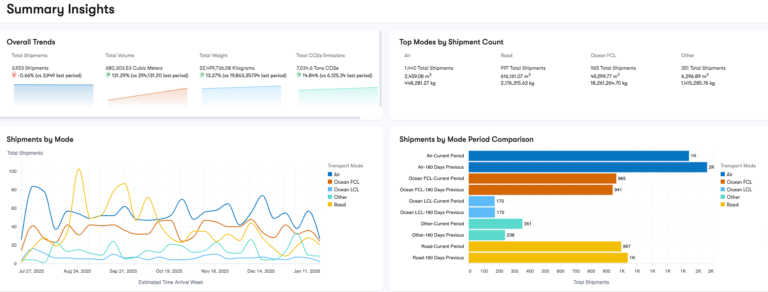
Captain surfaces live tariff intelligence, models the sourcing move before you make it, and alerts you when a rule changes, so what-if scenarios, duty-savings signals, and trade analytics live in one dashboard, not a slide deck.
Trade advisory software is the in-app intelligence layer you license to see what tariffs cost you, model the alternative before you commit to it, and get alerted when a rule changes. Captain builds that intelligence into the platform so decisions run on live data instead of a quarterly report that is stale before it lands.
The Captain trade advisory module reads your Harmonized Tariff Schedule (HTS) exposure, runs a Tariff Calculator China to US and a Tariff Calculator Canada to US on your real lanes, and models tariff engineering and sourcing scenarios so you can see the duty impact of a move first. It flags tariff mitigation strategies like the First Sale Program, Incoterm Audit, HTS Product Line Review, and IEEPA Tariff Refunds, all inside the Captain platform and its Control Tower.
The value is Trade Analytics that surface 5-25% average duty savings as a signal in your dashboard, not a finding you pay for after the fact. When a strategy needs licensed people to execute it, trade consulting pairs with the software, and the screening and classification behind these decisions connect to trade compliance software from the same data, and the rate moves it reacts to are watched by the tariff tracker.
5-25%
Duty savings identified
Live
Tariff intelligence
24h
Response time
Free Product Demo
Talk to a Trade Advisory Lead
Quick 30-min walkthrough of tariff intelligence and a savings scenario on your lanes. No obligation.
We reply within 1 business day · Your data stays private.
Modules
Trade Advisory Software Modules and Capabilities
Six capabilities inside the Captain trade advisory module that turn tariff data into decisions, scenarios, and savings signals.
01
Tariff Intelligence and Calculators
Live duty rates and calculators show what each lane actually costs against the Harmonized Tariff Schedule.
Tariff Calculator China to US and Canada to US
Live HTS duty rates by product
Landed cost with tariff layered in
Historical tariff trend on your codes
02
Scenario and What-If Modeling
Model a sourcing change or tariff engineering move and see the duty impact before you commit.
Sourcing and country-of-origin scenarios
Tariff engineering impact modeling
Side-by-side landed-cost comparison
03
Tariff Alerts and Monitoring
Configurable alerts flag rule changes and new duties on your codes before they hit an invoice.
Alerts on tariff and rule changes
IEEPA and action-driven duty monitoring
Watch specific HTS codes and lanes
04
Duty Savings Opportunity Finder
The engine surfaces mitigation strategies that apply to your specific product and lane mix.
First Sale Program eligibility signals
Incoterm Audit and HTS Product Line Review flags
IEEPA Tariff Refund opportunity detection
05
Supply Chain Diagnostic
The Supply Chain Diagnostic tool scores your flow for duty exposure and mitigation potential.
Duty exposure scoring by lane
Bonded Warehouse deferral scenarios
Prioritized savings opportunity ranking
06
Trade Analytics and Reporting
Trade Analytics turn tariff and duty data into dashboards your team can act on.
Tariff intelligence is live in your dashboard, so a duty question is answered against current rates on your own HTS codes instead of a report that was already stale when it arrived.
What-if scenarios let you model a sourcing or tariff engineering move and see the landed-cost impact before you commit, so decisions are tested in software rather than learned on an invoice.
The opportunity finder surfaces mitigation strategies like First Sale and IEEPA refunds that apply to your specific mix, so 5-25% duty savings show up as a flagged signal rather than a missed one.
The engine is built by a licensed brokerage that executes these strategies, so the intelligence reflects what actually clears customs, not a theoretical model.
Onboarding
How Trade Advisory Software Onboarding Works
01
Trade Data Load
Load your HTS codes, lanes, and import history into Captain.
02
Exposure Baseline
Run the diagnostic to map your current duty exposure.
03
ERP Integration
Connect your ERP so tariff intelligence runs on live data.
04
Scenario and Alert Setup
Model your first savings scenarios and configure alerts.
05
Monitor and Act
Track exposure, catch changes, and surface savings monthly.
Tariffs move faster than any quarterly review can keep up with, and the savings hidden in your product and lane mix stay hidden until someone models them. Live intelligence, what-if scenarios, and automatic savings signals put that analysis in front of your team when a decision is still open.
CargoTrans turns trade advisory from a periodic report into a live, licensed engine that guides every sourcing and duty decision.
Free 30-minute demo with a savings scenario on your own lanes
No-obligation exposure baseline across your HTS codes
Support from trade data load through ERP integration and alerts
Backed by a licensed brokerage that executes the strategies
A CargoTrans trade advisory lead will baseline your exposure and model a savings scenario.
Protected by reCAPTCHA. We respond within 1 business day. No spam, ever.
Integrations
Trade Advisory Software Fed by Your Own Trade Data
The Captain trade advisory module connects to your ERP and import history, so tariff intelligence and scenarios run on your actual HTS codes, suppliers, and lanes rather than on generic sample data that never matches your exposure.
Because the module shares data with the platform, the same records that drive screening and classification also feed the diagnostic and the calculators, so a scenario you model reflects your real flow and its findings connect straight to the compliance and duty work downstream.
Trade Advisory Software with Enterprise-Grade Data Security
Your trade data, supplier terms, HTS codes, and landed costs, is commercially sensitive, so the module holds it under enterprise-grade access controls and keeps a record of who modeled what, not an open spreadsheet passed around by email.
The intelligence behind the scenarios is maintained by a licensed brokerage, so the tariff logic and mitigation signals reflect current rules and how strategies actually clear customs, and a question about a specific finding is answered by the team that built the model.
Trade advisory software is the in-app intelligence module you license to understand your tariff exposure, model alternatives, and act on duty-savings opportunities from inside one platform. Instead of commissioning a periodic report, your team sees live tariff intelligence on their own HTS codes, runs what-if scenarios on sourcing and tariff engineering moves, and gets alerted when a rule changes. The Captain trade advisory module reads your import data, calculates duty on real lanes, and surfaces mitigation strategies such as First Sale and IEEPA refunds that apply to your mix. It is software, not a consulting engagement: the analysis runs continuously in the dashboard rather than being delivered once and going stale. The goal is to make tariff decisions with current data at the moment they are open, not to review them after the invoice arrives.
How is this different from trade consulting done by people?
The software and the people cover different parts of the same work. Trade advisory software is the engine that surfaces tariff intelligence, models scenarios, and flags savings continuously and at scale, running the same analysis on every code and lane without waiting for an engagement. The human side, our trade consulting team, designs the strategy, handles the judgment calls, and executes moves like a First Sale program or a tariff engineering change that require licensed expertise to implement correctly. Most importers want both: the software so the analysis is always current and self-serve, and specialists so the harder strategies are built and executed properly. The software surfaces the opportunity and the size of it; the people turn that signal into an executed, compliant outcome. Licensing the module gives your team the intelligence layer that makes the expert work sharper and faster.
What is tariff intelligence in the platform?
Tariff intelligence is the live view of what duty your goods actually carry, mapped to your own Harmonized Tariff Schedule codes rather than a general rate table. The module pulls current duty rates for your products, layers them into landed cost, and shows the historical trend on the codes you care about, so a duty question is answered with today's number instead of last quarter's. This matters because tariff rates and trade actions change frequently, and a static spreadsheet is out of date almost immediately. By keeping the intelligence live in the dashboard and tied to your real codes and lanes, the software lets your team see exposure as it is now, compare it across suppliers and countries, and spot where duty is quietly eroding margin. It is the foundation the scenarios, alerts, and savings signals all build on.
How does scenario and what-if modeling work?
Scenario modeling lets you test a change before you make it. You take a real product or lane, then model an alternative, sourcing from a different country, restructuring under a tariff engineering approach, or changing an Incoterm, and the module calculates the duty and landed-cost impact side by side. That turns a decision that would otherwise be made on assumption into one made on numbers. Because the scenarios run on your actual import data, the comparison reflects your real volumes and costs, not a generic example. You can model as many alternatives as you want and rank them by savings. This is how a sourcing move that looks cheaper on unit price is checked for its true landed cost once duty is layered in, so the option you choose is the one that actually lowers total cost rather than just the sticker.
What are the tariff calculators for China to US and Canada to US?
The module includes lane-specific calculators, including a Tariff Calculator China to US and a Tariff Calculator Canada to US, that compute the duty and total landed cost for a shipment on those routes using your product's HTS code and value. Rather than looking up a base rate and manually adding the various duties and trade-action tariffs that apply, your team enters the product and the calculator returns the full duty picture for that lane. These two lanes are built out because they carry some of the most active and complex tariff exposure importers face. The calculators pull from the same live tariff intelligence as the rest of the module, so the numbers stay current as rates change. They are also the quickest way for a team new to the platform to see concrete duty figures on the lanes they run most.
What is tariff engineering and how does the software support it?
Tariff engineering is the practice of legally structuring a product, its components, or its country of origin so it falls under a lower-duty classification or qualifies for more favorable treatment. Done properly it can meaningfully cut duty without changing what the customer receives. The software supports it by letting you model the impact of a tariff engineering move before you commit: you compare the current classification and duty against the engineered alternative and see the landed-cost difference on your real volumes. That modeling tells you whether a change is worth pursuing and how large the saving would be. The software surfaces and sizes the opportunity; executing a tariff engineering strategy still requires licensed expertise to implement correctly and defend, which is where the advisory team takes the signal the software produced and turns it into a compliant, executed change.
What is the First Sale Program and how does the tool help?
The First Sale Program is a valuation strategy that lets qualifying importers declare customs value based on the first sale in a multi-tier transaction, typically the price the factory charged the middleman, rather than the higher price the importer paid. Because duty is assessed on that lower value, the saving can be significant on eligible goods. The advisory module helps by flagging where your transactions have the multi-tier structure that makes First Sale potentially applicable, and by modeling the duty difference so you can see the size of the opportunity before pursuing it. This turns First Sale from a strategy you have to already know about into a signal the software raises for you. Qualifying and implementing First Sale requires documentation and licensed expertise, so the tool identifies and sizes the opportunity and the advisory team executes it.
What are the Incoterm Audit and HTS Product Line Review features?
Both are opportunity-finding features that examine your existing trade data for savings and risk. The Incoterm Audit reviews the shipping terms on your transactions to flag where the Incoterm you are using may be inflating your dutiable value or shifting cost and risk unfavorably, since the terms affect what is included in customs value. The HTS Product Line Review scans your product catalog for classifications that look inconsistent, outdated, or higher than necessary, flagging codes worth a closer look for both compliance and duty savings. Together they surface the two most common places duty leaks out: mispriced terms and misapplied classifications. The software raises these as flags with the potential impact attached, so your team knows where to focus. Acting on a flag, correcting a classification or renegotiating terms, is where the advisory expertise comes in.
What are IEEPA tariff refunds and how does the software detect them?
IEEPA tariff refunds relate to duties imposed under emergency economic powers that may later be reduced, suspended, or ruled refundable, creating an opportunity to recover duty already paid. Because these actions and their reversals move quickly and unpredictably, the exposure and the refund opportunity are easy to miss without active monitoring. The advisory module tracks these action-driven duties on your codes and lanes, so when a change creates a refund opportunity, it is flagged against the shipments in your history that qualify rather than left for you to discover. That detection is the hard part: knowing a rule changed is one thing, knowing which of your past entries it affects and what they are worth is another. The software connects the change to your data and sizes the potential refund, and the advisory team handles the recovery process from there.
What is the Supply Chain Diagnostic tool?
The Supply Chain Diagnostic tool scores your trade flow for duty exposure and mitigation potential, giving you a prioritized picture of where the savings are before you dig into any single strategy. It reviews your codes, lanes, suppliers, and volumes and ranks the opportunities, so instead of guessing whether First Sale, tariff engineering, a Bonded Warehouse deferral, or a classification fix is worth pursuing, you see which one moves the most money for your specific operation. It also models deferral scenarios, such as holding goods in a bonded warehouse to defer duty, alongside outright savings strategies. The diagnostic is usually the starting point in onboarding because it turns a broad question, where should we focus, into a ranked list. From there your team and the advisory specialists work the highest-value opportunities first rather than spreading effort thin.
How do tariff alerts work?
Tariff alerts are configurable notifications that tell you when something relevant to your goods changes, before it shows up as a surprise on an invoice. You choose the HTS codes, countries, and lanes you care about, and the module monitors them for rate changes, new trade actions, and IEEPA-driven duties, then alerts your team when one hits. This matters because tariff changes are frequent and rarely announced in a way that maps to your specific exposure, so without monitoring the first sign is often a higher duty bill. With alerts, a change becomes a signal you can act on: adjust sourcing, accelerate or delay a shipment, or trigger a scenario to model the impact. The monitoring runs continuously in the background, so your team is watching the tariffs that affect them without manually checking government sources every week.
How much duty can the software help me save?
Across the mitigation strategies the module surfaces, importers commonly identify duty savings in the range of 5 to 25 percent of duty paid, though the actual figure depends entirely on your product mix, sourcing, and how much of your current exposure is addressable. Some savings come from correcting classifications or Incoterms, some from valuation strategies like First Sale, some from tariff engineering, and some from refunds like IEEPA. The software's job is to find and size these opportunities against your real data so you know the number before committing effort, rather than assuming a generic percentage. A duty-savings scenario on your own lanes during the demo is the most reliable way to see your figure. The identified savings are what the software surfaces; capturing them fully usually pairs the intelligence with licensed advisory execution.
Does the software integrate with my ERP and trade data?
Yes. The trade advisory module connects to your ERP and import history so the intelligence, scenarios, and diagnostic run on your actual HTS codes, suppliers, values, and lanes rather than on sample data. That integration is what makes the output trustworthy: a scenario is only useful if it reflects your real volumes, and a savings signal only matters if it is tied to your real exposure. Because the module shares data with the wider platform, the same records feed screening, classification, and duty work, so a decision you model here connects to the compliance and filing steps downstream without a second data load. If a full integration is not needed immediately, you can load your trade data directly to get started. The aim is one source of trade truth driving both the advice and the execution.
How long does onboarding take?
A clean set of trade data can be producing intelligence within a couple of weeks: about a week to load your HTS codes, lanes, and import history, a short run of the Supply Chain Diagnostic to baseline your exposure, and configuration of your ERP connection so the data stays live. Onboarding usually starts with the diagnostic because it ranks where your savings are and gives your team an immediate focus rather than an empty dashboard. From there you model your first scenarios and set up the alerts that matter to your codes and lanes. More complex accounts with many codes, suppliers, and lanes take longer to baseline, but the gate is generally the completeness and quality of your trade data. Clean import history on day one is the biggest driver of accurate intelligence and a fast, useful start.