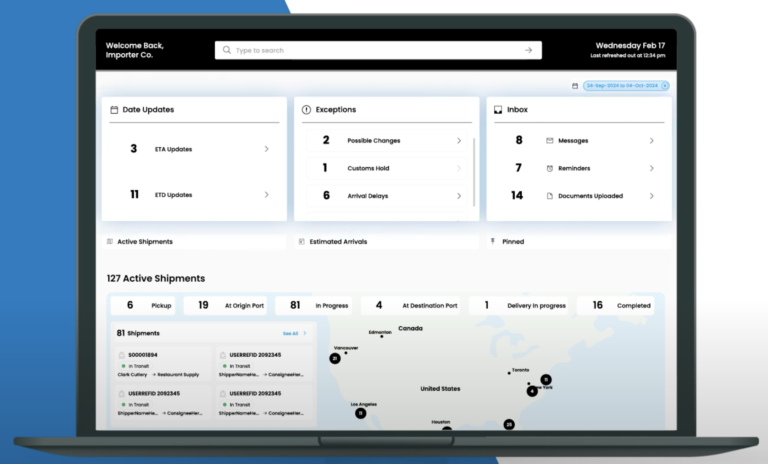
Captain pulls every shipment, mode, and milestone into one live operating picture, then flags the exceptions that need a decision —
one screen for ocean, air, rail, and road, so your team stops stitching updates together from email, portals, and spreadsheets.
What Does a Supply Chain Control Tower Actually Do?
A supply chain control tower is a single live view of every booking, milestone, and exception across ocean, air, and ground, fed by the systems that already move your freight. It replaces the status call and the shared spreadsheet with one feed your team, your brokers, and your carriers all read from.
Captain is the digital engine that powers CargoTrans's Customs Control Tower operating model, built for multimodal management across ocean, air, rail, and road. It posts each milestone the moment it lands and layers real-time analytics and reporting on top, so status is a screen you open, not a status call you make.
Because the value of a control tower is only as good as the data feeding it, Captain runs comprehensive data integration across ERP, TMS, and WMS systems, including CargoWise ERP integration, to deliver end-to-end visibility, feeding the same live picture that powers supply chain visibility software and the inventory events in warehouse management software. If you want the human operating layer that sits on top of this technology, our supply chain visibility service pairs the platform with a team that watches the exceptions with you.
4
Modes in one view
Real-time
Milestone posting
24h
Response time
Free Platform Review
Talk to a Technology Lead
Quick 30-min walkthrough of your data sources and fit. No obligation.
We reply within 1 business day · Your data stays private.
Modules
What the Supply Chain Control Tower Covers
Six modules inside Captain that turn scattered shipment data into one operating picture your team can actually run from.
01
End-to-End Visibility
Every shipment and milestone across all modes lands in one live view, updated as events happen.
Ocean, air, rail, and road on one screen
Milestone posting in real time
Container, order, and SKU-level drill-down
Predicted ETAs with delay flags
02
Automated Workflow and Exception Management
Rules watch the flow so people do not have to, escalating only the shipments that need a decision.
Configurable exception rules and thresholds
Auto-routed alerts by role and lane
Tasks and follow-ups tracked to close
03
Real-Time Analytics and Reporting
Dashboards and scheduled reports turn milestone data into trends, KPIs, and board-ready numbers.
On-time and dwell KPI dashboards
Lane, carrier, and cost breakdowns
Exportable and scheduled reports
04
Comprehensive Data Integration
Captain connects to the systems you already run so data flows in without manual re-keying.
ERP, TMS, and WMS connectors
CargoWise ERP integration
EDI and API feeds from carriers
05
Multimodal Management
Manage ocean, air, rail, and road shipments in one place instead of one portal per carrier.
Unified booking and milestone tracking
Mode comparison on cost and transit
Cross-mode handoff visibility
06
Cost Control and Risk Insights
See landed cost drivers and emerging risks against live shipment data, not last month's report.
Why Run Your Supply Chain Control Tower on Captain?
Captain is built by a forwarder and broker that moves the freight it tracks, so the data model matches how shipments actually behave, not a generic logistics abstraction.
Comprehensive data integration across ERP, TMS, and WMS, including CargoWise, means the platform reflects your systems of record instead of asking your team to re-key events by hand.
Automated exception management surfaces only the shipments that need a decision, so a small team can run a large flow without watching every milestone manually.
Time to value is measured in weeks, not a multi-quarter implementation, because the Customs Control Tower operating model and connectors already exist and are configured to your lanes.
Implementation
How Control Tower Onboarding Works
01
Connect Your Data
Link your ERP, TMS, WMS, and carrier feeds through API, EDI, or connector.
02
Configure Rules and Views
Set exception thresholds, KPIs, and role-based dashboards to your lanes.
03
Onboard Your Team
Provision users and roles, then train operators on the exception workflow.
04
Go Live
Run live shipments through Captain and validate milestones against source data.
05
Optimize and Review
Tune alerts, add reports, and review KPI trends with your success lead.
Your shipment data already exists; it is just scattered across portals, inboxes, and spreadsheets. A control tower brings it into one place so status is something you see, not something you chase.
Captain turns fragmented tracking into one operating picture your whole team can run from.
Free 30-minute platform walkthrough with a technology lead
No-obligation review of your data sources and integration fit
Guided onboarding from first connector to go-live
Optional supply chain visibility service to watch exceptions with you
A CargoTrans technology lead will map your data sources and show Captain against your lanes.
Protected by reCAPTCHA. We respond within 1 business day. No spam, ever.
Integrations
Control Tower That Connects Your Whole Stack
Captain runs comprehensive data integration across ERP, TMS, and WMS platforms, with CargoWise ERP integration and EDI and API feeds from your carriers, so milestones flow into one place instead of being re-keyed from portal to spreadsheet.
Because the same data model drives every module, the control tower connects cleanly to multimodal transportation and to inventory events from warehouse management software, giving one operating picture from booking to shelf rather than a stack of disconnected tools.
Access is role-based, so a carrier, a customer, and an internal planner each see only what they should, and single sign-on and multi-factor authentication keep account access controlled rather than shared over email.
Every status change, override, and exception decision is timestamped and logged, so the control tower doubles as an audit trail your compliance and finance teams can rely on when a shipment or a charge is questioned later.
Control tower software is a central platform that collects shipment data from every carrier, forwarder, and internal system you use, then presents one live picture of where freight is, what is running late, and what needs attention. Instead of logging into a dozen carrier portals and reconciling emails, your team works from a single screen that updates as events happen. Captain adds automated exception management on top, so the platform does not just show status, it flags the shipments that need a decision and routes them to the right person. The result is fewer manual status checks, faster reactions to delays, and a shared source of truth across operations, customer service, and management rather than scattered spreadsheets.
What are the advantages of a supply chain control tower?
Three, in the order importers notice them. Exceptions surface while they can still be fixed, so a rolled sailing or a customs hold reaches the person who can act instead of appearing in a weekly report. Second, the status call disappears: everyone reads the same feed, which is where most of the coordination time goes. Third, the record is built as goods move, so audits, claims, and duty reviews draw on data captured at the event rather than reconstructed months later. The gain is operational time first and freight cost second.
Which systems and carriers can Captain integrate with?
Captain is built for comprehensive data integration across the systems you already run. That includes ERP platforms, transportation management systems, and warehouse management systems, with CargoWise ERP integration among the supported connections. On the carrier side it takes EDI and API feeds for ocean, air, rail, and road so milestones post automatically rather than being entered by hand. The goal is that the control tower reflects your systems of record without asking your team to re-key events. During onboarding we map your specific data sources, confirm which connectors and feeds apply, and validate that milestones landing in Captain match the source system before you rely on them for decisions.
How long does it take to implement control tower platform?
Most teams go live in weeks rather than the multi-quarter timeline a heavy enterprise system implies, because Captain's connectors and the Customs Control Tower operating model already exist and are configured to your lanes. A typical rollout connects your core data sources first, configures exception rules and dashboards to how you actually work, provisions users and roles, then runs live shipments through the platform to validate milestones against source data. Simple data landscapes move faster; deep or messy integrations take longer. The pace is usually set by how clean your source data is and how quickly your IT team can approve connections, not by the platform itself. We sequence go-live so visibility comes online before you tune the finer analytics.
Do we license Captain or does CargoTrans operate it for us?
Both models exist, and they solve different needs. You can license Captain as software and run it with your own team, using the modules, dashboards, and exception rules to manage your flow directly. Alternatively, you can pair the platform with our supply chain visibility service, where a CargoTrans team watches the exceptions alongside you and acts on the alerts. Many importers start with the platform and add the managed layer during peak season or as volume grows. The right choice depends on whether you have the staff to work exceptions daily or would rather buy the outcome. We walk through both during the platform review so the model matches your team's capacity.
What does the exception management workflow actually do?
Exception management is the difference between a dashboard you have to watch and a system that watches for you. In Captain you set rules and thresholds, for example a shipment that misses a milestone, a container placed on hold, or a cost that exceeds budget, and the platform automatically flags matching shipments and routes them to the right person by role and lane. Each exception becomes a task that is tracked until it closes, so nothing quietly slips. This lets a small team run a large flow, because they spend their time on the handful of shipments that need a decision instead of scrolling through the hundreds that are fine. Every action is logged for later review.
Can control tower platform track ocean, air, rail, and road together?
Yes. Multimodal management is core to Captain, not an add-on. Ocean, air, rail, and road shipments all post milestones into the same operating picture, so a load that moves ocean then rail then final-mile road shows as one continuous journey rather than three disconnected records. Your team compares modes on cost and transit, sees the handoff points where delays usually hide, and tracks every leg from one screen. This matters most for importers who split volume across modes seasonally or reroute around disruption, because the control tower keeps a single view even when the physical path changes. You stop logging into a separate portal for each carrier and each mode.
What analytics and reporting come with the platform?
Captain layers real-time analytics and reporting on top of the live milestone feed. Standard dashboards cover on-time performance, dwell and transit times, exception volumes, and cost by lane, carrier, and mode. Because the numbers come from live shipment data rather than a monthly export, you can act on a trend while it still matters instead of reviewing it after the quarter closes. Reports can be scheduled and exported for finance, customers, or leadership, and views are role-based so each audience sees the metrics that matter to them. If you need a specific KPI or board format, we configure it during onboarding so the reporting reflects how your business measures performance, not a generic template.
Is Captain control tower platform secure?
Security is built into how access and data are handled. Access is role-based, so carriers, customers, and internal staff each see only what they should, and single sign-on with multi-factor authentication keeps accounts controlled rather than passwords shared over email. Every status change, override, and exception decision is timestamped and logged, which gives you an audit trail as well as a visibility tool. Data flows in over secured API and EDI connections that your IT team reviews before they go live. During the platform review we walk through the access model, authentication, and logging so your security and compliance stakeholders can sign off before any real data connects, rather than discovering the controls after go-live.
How does control tower platform reduce logistics costs?
It reduces cost in three ways. First, it removes manual work: milestones post automatically, so people stop spending hours pulling status from portals and email, which frees that time for exceptions that actually matter. Second, it catches problems early, so a hold or a missed connection is handled before it becomes a demurrage charge or an expedite. Third, it exposes cost drivers against live data, comparing lanes, carriers, and modes so sourcing and routing decisions are made on evidence rather than habit. Captain's cost control view tracks variance and accessorials so overspend is visible while you can still act on it. The savings come from fewer surprises and better decisions, not from a single line item.
Who on our team uses the control tower day to day?
Different roles use it for different jobs, which is why access is role-based. Operations and customer service staff live in the exception workflow, working the flagged shipments and updating customers from the same live data. Planners and managers use the analytics to spot trends, compare carriers, and reallocate volume. Finance pulls cost and accessorial reporting, and leadership uses scheduled dashboards for the summary numbers. Because everyone works from the same operating picture, the handoffs between teams stop generating conflicting versions of status. During onboarding we set up the roles and views so each group sees exactly what it needs on day one, rather than dropping everyone into the same crowded screen.
Does the control tower connect to warehouse and inventory data?
Yes. Captain is designed so the modules share one data model, which means the control tower can bring in inventory and fulfillment events alongside in-transit milestones. Connected to warehouse management, it shows not just where freight is on the water but what is on hand, what is committed, and what is due to replenish, so planning is based on the whole flow rather than transit alone. This closes the common gap where a team can see a container arriving but not whether the receiving warehouse is ready for it. For importers who run both transportation and distribution, the unified picture turns replenishment into a planned event instead of a reactive scramble.
Can we start with visibility and add modules later?
Yes, and most teams do. The usual path is to bring end-to-end visibility online first, so your team gets one live picture of shipments quickly, then layer on exception automation, analytics, and deeper integrations as adoption grows. Because the modules run on the same platform and data model, adding a capability later is a configuration step, not a new implementation project. This phased approach reduces risk: you prove value on visibility before committing to broader change management, and your team adopts one workflow at a time rather than everything at once. We map a sensible sequence during onboarding based on where your biggest pain is today, whether that is tracking, exceptions, or reporting.
How does Captain fit with CargoTrans's other services?
Captain is the technology layer, and it is designed to sit under the operational services CargoTrans provides. The Customs Control Tower operating model uses the same platform to manage entries and compliance, so importers who also use our brokerage or forwarding get one connected picture rather than a software tool bolted onto an unrelated operation. If you want people as well as software, the supply chain visibility service pairs the platform with a team that works the exceptions with you. The point is that the data does not stop at the edge of one department. Whether you buy only the software or the software plus the service, the operating picture stays continuous across transportation, customs, and distribution.