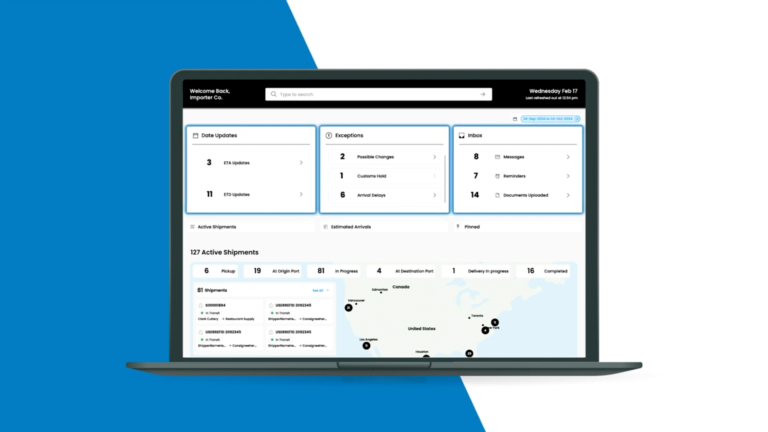
Source carriers, match loads, track coverage, settle both sides, and show shippers real status —
sourcing, matching, margin, settlement, and scorecards in one broker operations system your desk runs from quote to cash.
Free platform demo on your own lanes
No-obligation review of your cover and margin workflow
A TMS for freight brokers is the operating system of a brokerage: it sources and vets carriers, matches open loads to the right one, tracks the load to delivery, protects the margin between buy and sell, and settles both the carrier payable and the shipper receivable. Unlike shipper software, the broker version is built around a spread and a two-sided book, buying capacity on one side and selling coverage on the other. Every load the desk covers is tracked to delivery in shipment tracking software, so a rep answers a shipper's where-is-it without leaving the record the margin lives on.
Atlas TMS runs that full cycle from one record. A load comes in, the desk matches it to a vetted carrier, the buy and sell rates set the margin on screen, and settlement pays the carrier and invoices the shipper from the same shipment. Carrier data lives in carrier management software so onboarding docs, insurance, authority, and a performance scorecard travel with every carrier you use.
The broker desk lives on speed and coverage. Atlas keeps quoting, matching, and dispatch in one flow so a rep is not tabbing between a load board, a spreadsheet, and an accounting tool while a shipper waits. Whether the load moves full truckload or less than truckload, the margin and the settlement are calculated the same way, so nothing books at a spread you did not see.
2-4x
Loads per rep per day
<1 day
To a live demo
24h
Response time
Free Demo
See Atlas on Your Lanes
A 30-min demo of matching and margin on your freight. No obligation.
We reply within 1 business day · Your data stays private.
Capabilities
Our TMS for Freight Brokers Capabilities
Six functions a brokerage desk runs in Atlas to cover more loads, protect margin, and settle both sides clean.
01
Carrier Sourcing and Vetting
Find, onboard, and clear carriers with authority, insurance, and documents checked before a load is offered.
Authority and insurance verification
Onboarding packet and document capture
Fraud and double-broker flags at dispatch
Approved-carrier list ready to match
02
Load Matching and Coverage
Match open loads to the right carrier fast, so coverage happens before the pickup window closes.
Loads matched by lane and equipment
Available-capacity and history surfaced
One-flow quote, cover, and dispatch
03
Margin and Rate Management
See buy, sell, and spread on every load, so nothing books at a margin the rep never saw.
Buy and sell rates on one screen
Target-margin and floor guardrails
Spot and contract rates compared
04
Settlement and Cash
Pay the carrier and invoice the shipper from the same shipment, with quick-pay and factoring handled.
Carrier payable and shipper invoice linked
Quick-pay and factoring supported
Margin reconciled at settlement
05
Carrier Scorecards
Rank carriers on on-time, claims, and tender acceptance, so the next load goes to the ones who perform.
On-time pickup and delivery scoring
Claims and service-failure history
Preferred-carrier ranking by lane
06
Shipper Visibility Portal
Resell real-time status to your shippers under your own brand, so tracking becomes a reason they stay.
One flow from quote to cash lets a rep cover more loads a day, because matching, margin, and dispatch happen on one screen instead of across a load board, a spreadsheet, and an accounting tool.
Margin is visible on every load before it books. Buy, sell, and spread sit on the same record with floor guardrails, so a load never moves at a number the desk did not approve.
Carrier vetting is built into dispatch. Authority, insurance, and double-broker checks clear before a load is offered, so the fraud and reload losses that eat broker margin are caught early.
You resell visibility as your own product. The white-label shipper portal turns tracking into a reason a customer renews rather than a status call your team fields all day.
Onboarding
How Atlas TMS Onboarding Works for Brokers
01
Import Your Book
Load your carriers, shippers, lanes, and rate history into Atlas.
02
Set Margin Rules
Define target margins, floors, and approval thresholds by lane.
03
Connect Systems
Link load boards, carrier feeds, and your accounting tool.
04
Run Live Loads
Quote, match, cover, and settle real freight with your reps.
05
Score and Tune
Review carrier scorecards and margin, then refine the rules.
Run Your Brokerage on Atlas TMS for Freight Brokers
A broker desk wins on speed, coverage, and margin discipline. With sourcing, matching, margin, and settlement in one flow, your reps cover more loads a day and no shipment books at a spread nobody saw.
Atlas turns a brokerage from a stack of tabs and spreadsheets into one measured, licensable operating system.
Free 30-minute demo of matching and margin on your lanes
No-obligation review of your cover-to-cash workflow
Integration support from load board to accounting settlement
White-label shipper portal you resell under your own brand
An Atlas lead will map your cover-to-cash flow and show where the platform lifts loads per rep.
Protected by reCAPTCHA. We respond within 1 business day. No spam, ever.
Integrations
Atlas TMS Connects Your Broker Stack
Atlas connects to load boards, carrier feeds, and your accounting system so a load moves from posting to settlement without re-keying. Loads flow in, matched shipments and margin post back, and carrier payables and shipper invoices reconcile into the accounting tool your finance team already uses.
Carrier onboarding, insurance, and status feeds run through the same connections, and the platform links to carrier management software so a new carrier is vetted, documented, and scored in one workflow rather than three disconnected steps.
Role-based access decides who can quote, who can approve a below-floor margin, and who can release a carrier payment, so a spread and a payout sit behind the right permission. Every rate override and settlement action is logged against the user who made it.
Your carrier and shipper book is your data, encrypted and isolated to your account. Double-broker and fraud checks clear carriers before dispatch, and the same audit trail that settles a load also shows exactly who changed a buy rate, a sell rate, or a margin floor and when.
A TMS for freight brokers is the operating system a brokerage runs to source carriers, match them to open loads, track coverage, protect the margin between buy and sell, and settle both the carrier payable and the shipper receivable. Unlike shipper software that manages one company's freight, the broker version is built around a two-sided book and a spread, because a broker buys capacity on one side and sells coverage on the other. Atlas TMS brings sourcing, matching, margin management, settlement, and carrier scorecards into one flow, so a rep quotes, covers, dispatches, and hands off to settlement from a single shipment record instead of jumping between a load board, a spreadsheet, and an accounting tool while a shipper waits on the line.
How does Atlas help me cover loads faster?
Atlas keeps quoting, matching, and dispatch in one flow so a rep is not tabbing between systems while the pickup window shrinks. When a load comes in, the platform surfaces carriers by lane, equipment, and past performance, shows their available capacity, and lets the rep cover and dispatch without leaving the record. Carriers are already vetted, so there is no scramble to check authority and insurance at the moment of dispatch. Because matching and margin sit on the same screen, the rep sees the spread while choosing the carrier rather than after. Brokers running this flow typically move two to four times the loads per rep per day compared with a spreadsheet-and-load-board routine, which is where the platform earns its cost.
How does Atlas protect my margin on every load?
Margin protection starts with visibility. Every load shows the buy rate, the sell rate, and the resulting spread on one screen, so no shipment books at a number the rep never saw. You set target margins and hard floors by lane, and Atlas flags or blocks a load that would move below the floor unless someone with the right permission approves it. At settlement, the actual carrier payable and shipper invoice reconcile back to the quoted margin, so a spread that eroded through accessorials or a rate change is caught rather than absorbed. The same data rolls into reporting, so you can see margin by lane, by customer, and by rep, and coach the desk on where the spread is thin.
Can Atlas vet carriers and prevent double brokering?
Yes, and for a brokerage this is a core reason to run the platform. Atlas verifies carrier authority and insurance during onboarding, captures the document packet, and keeps an approved-carrier list ready to match. At dispatch it runs fraud and double-broker checks, flagging identity mismatches and patterns that signal a load could be re-brokered or stolen, before the load is offered. Because vetting is built into the dispatch flow rather than a separate manual step, a rep cannot accidentally tender to an unverified carrier under time pressure. Given how much a single fraudulent reload or a cargo theft can cost a brokerage, catching it before dispatch is one of the clearest ways the system protects margin and reputation.
How does settlement and carrier payment work?
Settlement in Atlas ties the carrier payable and the shipper invoice to the same shipment, so the spread you quoted is the spread you reconcile. When a load delivers and the paperwork clears, the carrier payment and the customer invoice are generated from that record and posted to your accounting system. Quick-pay and factoring are supported, so carriers who want faster money are handled without a side process. Because both sides settle off one shipment, a margin that changed through an accessorial or a rate adjustment is visible rather than lost between two tools. Finance sees a clean tie from booked margin to cash, and the desk is not re-keying loads into a separate accounting system after the freight already moved.
What are carrier scorecards and how do they help?
Carrier scorecards rank the carriers you use on the things that decide whether a load goes smoothly: on-time pickup and delivery, claims and service failures, and tender acceptance. Atlas builds the score from the loads you actually ran, so it reflects your experience with a carrier, not a generic rating. When a rep is matching a load, the scorecard surfaces the carriers who perform on that lane, so coverage goes to the ones who deliver rather than whoever is cheapest that hour. Over time the scorecard shapes a preferred-carrier list by lane, which raises service to your shippers and cuts the claims and re-cover costs that quietly erode margin. It turns carrier selection from a gut call into a data-backed one.
Can I give my shippers tracking without exposing my system?
Yes. Atlas includes a white-label shipper visibility portal where your customers see real-time status, milestones, exceptions, and proof of delivery on their loads under your brand, not ours and not the carrier's. Your reps stop fielding status calls all day because the shipper can self-serve the tracking, and you turn visibility into a product that makes a customer more likely to renew. The portal exposes only the load status and documents you choose to share, never your carrier rates, your margin, or the rest of your book. For a brokerage competing against larger players, reselling clean visibility under your own name is a differentiator that used to require building software, and here it ships with the platform.
How is a broker TMS different from shipper TMS software?
Shipper software manages one company's freight: rate against contracts, tender, track, and audit invoices, all to move that shipper's goods at the lowest cost. A broker TMS manages a two-sided business. It handles a buy side, sourcing and vetting carriers and negotiating capacity, and a sell side, quoting and covering loads for shippers, with margin as the number that matters. That means carrier onboarding, fraud checks, load matching, margin guardrails, dual settlement, and a shipper-facing portal, none of which a pure shipper tool needs. Atlas offers editions for both, built on the same engine, so a brokerage gets the two-sided workflow while a shipper gets the single-book one, and the shared platform means integrations and data models are consistent across them.
Does Atlas integrate with load boards and my accounting tool?
Yes. Atlas connects to major load boards so postings and available capacity flow into the matching screen, and it connects to your accounting system so carrier payables and shipper invoices reconcile without re-keying. Carrier feeds bring in status milestones, and API or EDI links carry tenders and documents both directions. The goal is a single flow from a load posting through coverage, dispatch, tracking, and settlement into finance, so a rep is not copying a load between a board, a spreadsheet, and an accounting package. Standard integrations cover common brokerage tools, and if you use a niche accounting or factoring setup, we scope the connection during onboarding so cash reconciles the way your finance team already works.
How many reps can work in Atlas at once?
Atlas is multi-user with role-based permissions, so a whole desk works in it at the same time. Each rep covers loads, sees carrier scorecards, and works within the margin floors you set, while managers approve below-floor exceptions and finance handles settlement. Permissions decide who can quote, who can approve a thin margin, and who can release a carrier payment, and every override is logged to a user. This separation matters for a brokerage, because the person covering a load should not necessarily be the person approving a below-floor spread or releasing cash. Adding a rep is a permission change rather than a new contract, so the platform scales as your desk grows without a migration or a per-user renegotiation each time you hire.
What does it cost to run Atlas TMS for a brokerage?
Atlas pricing for brokers follows how you use the platform rather than one flat figure. Most brokerages are priced on load volume or on a combination of a base platform fee and rep seats, with settlement and factoring handled according to your cash setup. Because the right structure depends on your load count, rep headcount, and whether you resell the shipper portal, we quote after a workflow review rather than from a generic rate card. The comparison that matters is the platform cost against the extra loads per rep, the margin the guardrails protect, and the fraud losses the vetting prevents. The review is built to show that math on your own lanes before you commit to anything.
How long does it take to onboard my brokerage?
A brokerage with clean carrier and shipper data can be running live loads in about three to five weeks: roughly a week to import your book, a few days to set margin rules and floors, and a period to connect load boards, carrier feeds, and accounting before your reps run real freight in parallel. Larger desks with heavy integrations or multiple offices take longer because there is more data and more testing. We sequence it so matching and coverage go live first and settlement follows once margins reconcile cleanly against your accounting system. The usual gate is not the software, it is how complete and current your carrier documents, shipper contracts, and rate history are when we load them.
Can Atlas handle both truckload and LTL brokering?
Yes. Atlas matches, prices, and settles loads across truckload and LTL, so a desk that brokers both runs them in one system rather than two. The margin and settlement math work the same regardless of mode, so buy, sell, and spread are visible on an LTL load the same way they are on a full truckload, and carrier scorecards track performance per mode and lane. For LTL, the platform handles the tariff and accessorial detail that makes that mode fiddly, and for truckload it handles capacity matching and spot pricing. Running both modes on one record means a rep quoting a customer can compare options without switching tools, and finance reconciles a single margin regardless of how the freight actually moved.
Is my carrier and shipper book kept confidential?
Yes. Your carriers, shippers, rates, and margins are your data, encrypted and isolated to your account, and never shared with other brokerages on the platform. Role-based access controls who inside your team can see buy rates, sell rates, and margin, so sensitive pricing is not open to every seat. The shipper portal exposes only the load status and documents you choose to share, not your spread or your carrier costs. Every rate change and settlement action is logged against a user, so if a number moves you can see who moved it and when. For a brokerage whose margin depends on protecting its buy-sell spread, keeping that data confidential and access-controlled is a core requirement, not an add-on, and Atlas is built to it.