
• Captain
  • Atlas TMS
CargoTrans Inc.
  • Solutions
        • Logistics visibility platformControl Tower
          • Trade Advisory
          • Supply Chain
          • Tariff Tracker
          • Trade Compliance
          • Tariff Calculator
          • Control Tower
        • Customs Brokerage
        • Trade Compliance Management
        • Multimodal Transportation
        • International Transportation
          • Air Freight
          • Ocean Freight
          • Import & Export
          • Consolidation
          • Drayage
        • Technology & Visibility
        • Warehouse & Distribution
        • Domestic Transportation
          • Transload & Deconsolidation
          • Transportation Management System (TMS)
          • Truckload (TL)
          • Less Than Truckload (LTL)
          • Parcel Optimization
  • Who We Serve
    • Retail & Consumer Goods
    • Industrial Manufacturing
    • FF&E
    • Food & Beverage
    • OS&E and Hospitality
    • Cosmetics & Chemical Distributors
    • Our Customers
  • Who We Are
    • The CargoTrans Way
    • Core Values
    • Environmental, Social & Governance
    • Partnerships & Certifications
  • Careers
  • Insights
    • Blog
    • Market Updates
    • Resources
  • Contact
  • Get My Quote
  • Menu Menu

Captain Feature Guide: Mastering Split & Partial Orders

Flexibility is essential in global supply chains. When you need to ship part of an order immediately while the rest of the consignment is still being prepared, the traditional method often involves manual workarounds and re-entry.

The new Split & Partial Orders feature in Captain revolutionizes this process by allowing you to manage multiple fulfillments from a single original booking.

Explore Captain

What This Feature Solves

  • Problem: You have a 100-unit order, but only 40 units are ready to ship by the required vessel cut-off.
  • Old Solution: You had to cancel or edit the original booking and create a whole new one for the 40 units, leading to duplicate data entry and potential errors.
  • Captain Solution: You can now split the original order directly within the booking flow, instantly creating two separate, traceable fulfillments (one for 40 units, one for 60 units) that remain linked to the master order.
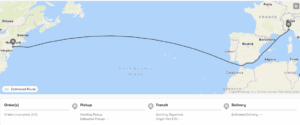
Revolutionizing Supply Chain Operations with Captain’s real-time tracking and milestone updates directly on the dashboard for optimized decision-making.

Contact us

How to Use Split & Partial Orders in Captain

This process is integrated into the Captain booking workflow, ensuring that all related data remains clean and connected.

Step 1: Access the Booking Flow

  1. Navigate to your main Shipments dashboard within Captain.
  2. Select the “Create New Booking” option, or find an existing active order that you need to fulfill partially.
  3. Proceed to the section where you input the Commodity/Quantity details.

Step 2: Define the Partial Shipment
When viewing the full quantity of the item(s) you intend to ship:

  1. Locate the new “Fulfillment” or “Split Order” option next to the item quantity field.
  2. Enter the Partial Quantity: For example, if the original order calls for 10 pallets, but you are only shipping 4 today, enter 4 in the fulfillment field.
  3. Captain will automatically calculate the Remaining Quantity (6 pallets) and designate this as the next scheduled fulfillment.

Step 3: Complete the Split and Schedule
Confirmation: You will be prompted to confirm the split. Captain will generate a unique fulfillment ID or reference number for the new, smaller shipment (e.g., Order-1234-A).

  1. Schedule First Fulfillment: Complete the booking process for the current partial shipment (Order-1234-A), including carrier selection, ETD/ETA, and required documentation.
  2. Future Fulfillment: The remaining quantity (6 pallets) will be held as a pending fulfillment (Order-1234-B) under the original master order. You can return to this pending fulfillment later to schedule the remaining units without having to re-enter all master order data.

Start improving your operations with Captain

If you’re ready to take control of your supply chain, Captain’s end-to-end visibility software is the perfect solution. Our system is designed to help businesses track, manage, and optimize every stage of their supply chain process, ensuring maximum efficiency, reduced risk, and improved customer satisfaction.

Contact us today to schedule a demo or learn more about how Captain can transform your supply chain operations.

"*" indicates required fields

A Leading Freight Forwarder and Supply Chain Partner for Domestic and International Transportation.


Meet Captain

Tariff Tracker

Tariff Calculator

Trade Advisory Service

Customs Duty Drawback

Supply Chain Visibility Software

Control Tower

Trade Compliance Software

Customs Brokerage Software

Customs Clearance Software

Customs Duty Software

Customs Compliance Software

Our Services

International Transportation

Domestic Transportation

Customs Brokerage

Warehouse and Distribution

Trade Compliance Management

Technology and Visibility

Contact Us

1129 Northern Blvd Suite 404, Manhasset, NY 11030

516-593-5871
[email protected]

Stay Connected

© CargoTrans, Inc.
  • Terms and Conditions
  • Sitemap
  • Privacy Policy
Link to: Our FF&E Logistics Guide to Furniture, Fixtures, and Equipment Supply Chains Link to: Our FF&E Logistics Guide to Furniture, Fixtures, and Equipment Supply Chains Our FF&E Logistics Guide to Furniture, Fixtures, and Equipment Supply...FE and E shipping and logistics services Link to: Advantages and Benefits of a Supply Chain Control Tower Link to: Advantages and Benefits of a Supply Chain Control Tower Tariff tracker toolAdvantages and Benefits of a Supply Chain Control Tower
Scroll to top Scroll to top Scroll to top